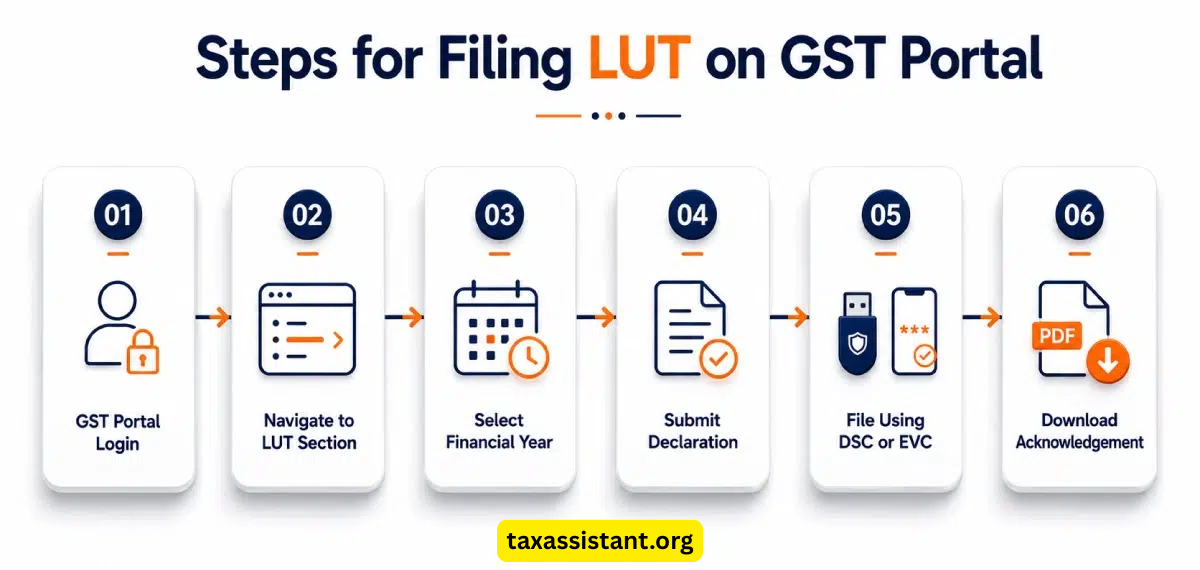
If you are an Indian freelancer, software developer, consultant, or agency working with international clients, you are legally engaged in the Export of Services. Under Indian GST laws, exporting services is treated as a Zero-Rated Supply. This means you do not have to pay 18% GST on your foreign earnings.However, to claim this 0% GST benefit legally without blocking your capital in upfront tax payments and tedious refund processes, you must file a Letter of Undertaking (LUT).In this comprehensive guide, we will walk you through the exact step-by-step process to file an LUT on the GST portal for the current financial year.
Thank you for reading this post, don't forget to subscribe!Reed More….https://taxassistant.org/resolving-income-tax-notices-with-professional-platforms/
What is an LUT (Letter of Undertaking) in GST?
An LUT is a legal document that a registered taxpayer submits to the GST department. By filing an LUT, you declare and undertake that you will fulfill all the export requirements and receive your payments in freely convertible foreign currency (or INR where permitted) within the timelines prescribed by FEMA regulations.Filing an LUT ensures that you can invoice your international clients with 0% GST instead of paying Integrated GST (IGST) upfront and then running after the government for a tax refund.
Eligibility: Who Needs to File an LUT?
You need to file an LUT if you satisfy the following conditions:
.You provide services to clients located outside India.
.Your place of supply is outside India, and you receive the payment in foreign currency (supported by a FIRC or BRC from your bank).
Reed More….https://taxassistant.org/check-tax-refund-status-3-steps/
.You have not been prosecuted for any tax evasion exceeding ₹2.5 Crores.
Note: An LUT is valid for only one financial year. You must file a fresh LUT at the beginning of every financial year (on or before April 1st).
Step-by-Step Process to File LUT on GST Portal
Filing an LUT is an entirely online, paperless, and free process. It takes less than 10 minutes if you follow these steps:
Step 1: Log in to the GST Portal
Go to the official GST website (www.gst.gov.in) and log in using your valid username and password credentials.
Step 2: Navigate to the LUT Form
Once logged in to your dashboard, navigate through the menu as follows:Click on Services > User Services > Form GST RFD-11 (Furnishing LUT).
Step 3: Select the Financial Year
On the RFD-11 page, you will see a drop-down menu for the Financial Year. Select the current financial year for which you want to secure the LUT clearance.
Step 4: Fill in the Prior LUT Details (If Applicable)
If you filed an LUT in the previous financial year, upload that previous LUT’s reference number (ARN). If this is your very first time filing an LUT, you can leave this section blank or select “No”.
Step 5: Accept the Declarations (The Undertaking)
You will see three check-boxes containing legal declarations. You must tick all three boxes to agree to the terms:
1. Undertaking to export services within the time frame specified under the GST rules.
2. Undertaking to observe all the provisions of the GST Act and rules.
3. Undertaking to pay the requisite tax along with interest if you fail to export the services within the prescribed timeline.
Step 6: Enter Witness Details
You need to provide the names, occupations, and complete addresses of two witnesses. These can be your family members, friends, or colleagues. No physical signatures or documents are required from the witnesses; just their basic information is enough.
Step 7: Sign and Submit the Form
.Select the place of filing.
.Select the authorized signatory name from the drop-down.
.Click on Sign and Submit with DSC (Digital Signature Certificate) or Sign and Submit with EVC (Electronic Verification Code via OTP sent to your registered mobile/email).
.Once the OTP is successfully verified, your Form RFD-11 is submitted.
How to Download Your Approved LUT
Immediately after submission, the GST system generates an Application Reference Number (ARN). Your LUT is usually approved instantly by the system.
To download it:
1. Go to Services > User Services > View/Download Certificates.
2. Locate your RFD-11 filing and click on Download to save the PDF copy for your official compliance records.
Conclusion
Filing an LUT is an indispensable step for every Indian remote worker and freelancer serving global markets. It protects your business cash flow and keeps your operations 100% compliant with the law. Make sure to share your downloaded LUT file with your Chartered Accountant (CA) during your regular annual tax filings.
Answer: If you do not have a valid LUT, you are legally required to charge 18% IGST on your export invoices, pay that tax amount to the government during your monthly GSTR-1/3B filings, and then manually claim a refund later.
Answer: While an IEC code is mandatory for physical goods export, it is generally not strictly enforced for basic digital services exports (like freelance writing or design). However, having an IEC is highly recommended if you scale your agency operations.
Answer: No physical signatures are required. You only need to type the accurate legal name and residential/business addresses of two witnesses in the online form.
Editing by katie willimas