Electronic checks, or eChecks, allow you to send payments faster and more securely than with paper checks, with no need for envelopes or stamps. While this digital banking tool is not very widely used by consumers, many of the companies you send monthly payments to already accept them as a form of payment.
What is an eCheck?
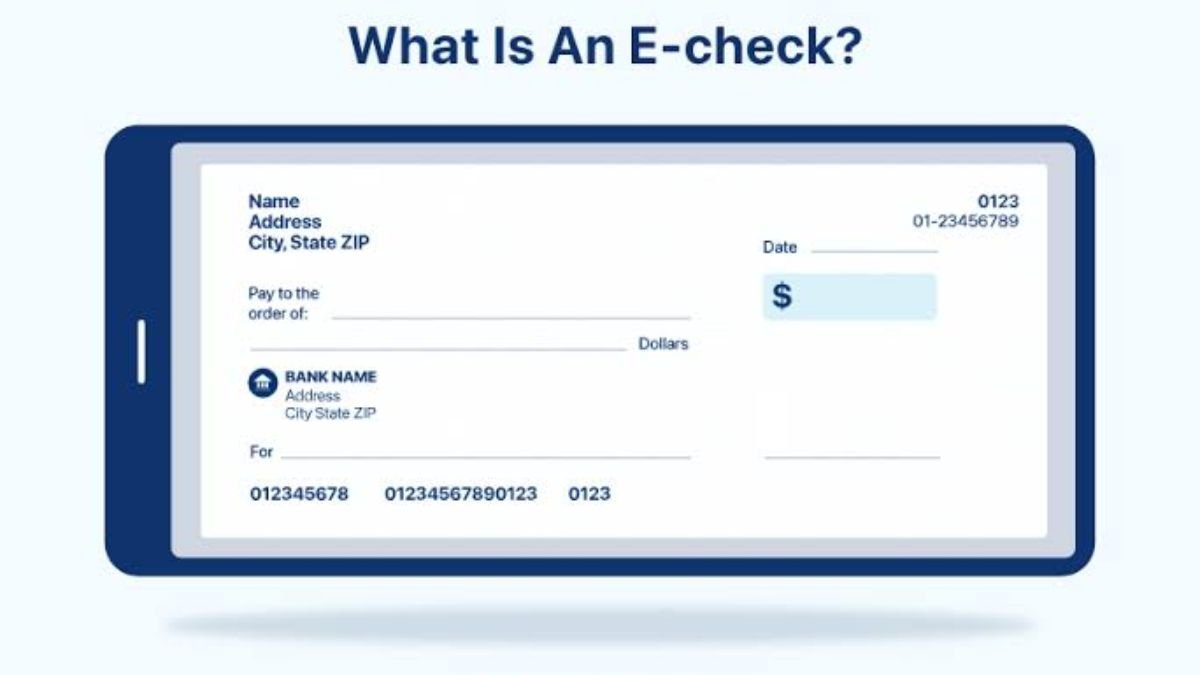
An electronic check, or eCheck, is a digital version of a paper check. eChecks have most of the same information you’ll find on physical checks, including your routing and account number, the payment amount, and check number.
The key difference: When you send an eCheck, the payment can be transferred instantly from your bank account to the recipient’s account via the secure Automated Clearing House (ACH) Network, with no need for a physical paper trail.
What can you use eChecks for?
Not all companies accept eChecks, but you can set up eCheck payments for many of your large bills and recurring payments, including:
- Loans
- Credit cards
- Utilities
- Subscriptions and membership fees
- Digital wallet transfers
- Taxes
For retail purchases, eChecks are not usually accepted.
How do eCheck payments work?
When you use an eCheck, money gets transferred from your bank account to the payee’s account via ACH payment. The process is safer and requires fewer steps than paper check payments, but you first need to authorize the payment online.
You can follow these steps to set up a one-time or recurring eCheck payment:
- Authorization: Use your bank’s online eCheck form or ACH set-up process to give the bank permission to withdraw the funds. Alternatively, to set up payments to a creditor or merchant, look up their online process for setting up eChecks.
- Payment details: Provide the requested information, which may include the recipient’s name and payment amount, as well as your bank account and routing number.
- Verification: The sending and receiving parties use the ACH network to verify the payment information and confirm that the funds are available.
- Funds transfer: The funds are transferred out of your account and into the payee’s account.
- Confirmation: You should receive an electronic receipt to confirm the transaction.
Like traditional checks, eChecks can be rejected due to insufficient funds. If your eCheck is rejected, you’ll likely be charged the same bank fees associated with a bounced check, and possibly a late fee from the payee.
How long does it take eChecks to clear?
With eChecks, payments can be completed faster than paper checks. Some transactions are processed immediately, though it typically takes up to one business day.
In addition to being processed faster than paper checks, you don’t have to order new checks by mail, take time to visit the post office to mail them, or wait for them to arrive at your payee’s address. That also means you don’t have to worry about the check getting lost or stolen in transit.
Are eChecks safe?
It’s normal to feel antsy about switching to a new payment method, but eChecks are far more secure than paper checks. Here are a few reasons why:
- There’s no paper document that can be lost or stolen
- They’re processed through the ACH network, which means they’re encrypted and authenticated
- Fewer people are involved with processing the payment, which leaves less room for human error and theft
Pros and cons of eChecks
| PROS | CONS |
|---|---|
| No envelopes or stamps required | Incorrect payments can be difficult to reverse |
| Can be processed instantly | Not offered by some financial insitutions |
| No paper waste | Not accepted by some merchants |
| More secure than paper checks | May be subject to transaction limits |
| Can send payments to individuals or businesses | Not processed on weekends or holidays |
| Recurring payments can be automated | |
| Can be used for some international payments | |
| More affordable for vendors to process than credit card payments |
Paying by eCheck versus credit card
eChecks are a great alternative to paper checks, but they’re not the best choice for all transactions. The best payment method for any given transaction depends on a few details.
For online payments, eChecks and credit cards are both convenient and take roughly the same amount of time to clear, but you might choose a credit card for these reasons:
- No need to authorize the transaction with your bank
- More likely to be accepted by retailers
- Earn credit card rewards
But for some payments, primarily recurring bills, using an eCheck is best. eChecks are more secure than credit cards and debit cards, and they can help you avoid credit card processing fees. Plus, eChecks don’t turn your purchases into debt like credit cards do, so you don’t have to worry about paying off the purchase later or accruing interest charges.
While both use the same bank account details (routing and account numbers), an eCheck is completely digital. Instead of relying on a physical paper check sent through the mail, an eCheck transfers funds electronically from your bank account to the payee’s account via the Automated Clearing House (ACH) network—eliminating the need for envelopes, stamps, and paper waste.
eChecks process faster than physical paper checks because they do not rely on postal delivery. Some eCheck transactions process immediately, while most typically clear within one business day. Keep in mind that payments are not processed on weekends or bank holidays.
Yes, eChecks are generally more secure than paper checks. They are encrypted and authenticated through the ACH network, eliminating the risk of a physical check being lost or stolen in transit. Additionally, fewer human handlers are involved in processing eChecks, which reduces the potential for theft or error.
Usually, no. Retailers and merchants generally do not accept eChecks for standard retail or in-store purchases. eChecks are primarily used for recurring bills, large non-retail payments (such as rent, loans, utilities, subscriptions, and taxes), and digital wallet transfers.
Just like traditional paper checks, an eCheck can “bounce” or be rejected if you have insufficient funds. If an eCheck is rejected, your bank will likely charge you an overdraft or NSF (non-sufficient funds) fee, and the payee may also charge you a late fee.

Manoj Sharma is a Senior Writer on the banking team at Tax Assistant. He provides information on budgeting, bank accounts, the banking industry, and other related topics. Using original data and methodologies, he helps you identify the best financial institutions, accounts, and products tailored to your needs. Manoj holds a degree in Journalism and Political Science from Syracuse University. All articles are strictly reviewed and fact-checked by our panel of expert Chartered Accountants, including CA Devendra Saini, CA Nikhil Khunteta, and CA Ankit Goyal