
In many employer stock purchase plans (ESPP), the purchase of stocks takes place through payroll deductions by making contributions to a stock purchase fund. The employer then uses those funds to purchase the stock for you. In many plans, the price the employee pays for the stock is usually at a discount of up to 15% under market price. The company holds the stock until the employee decides to sell it.
There are qualified ESPPs and nonqualified ESPPs.
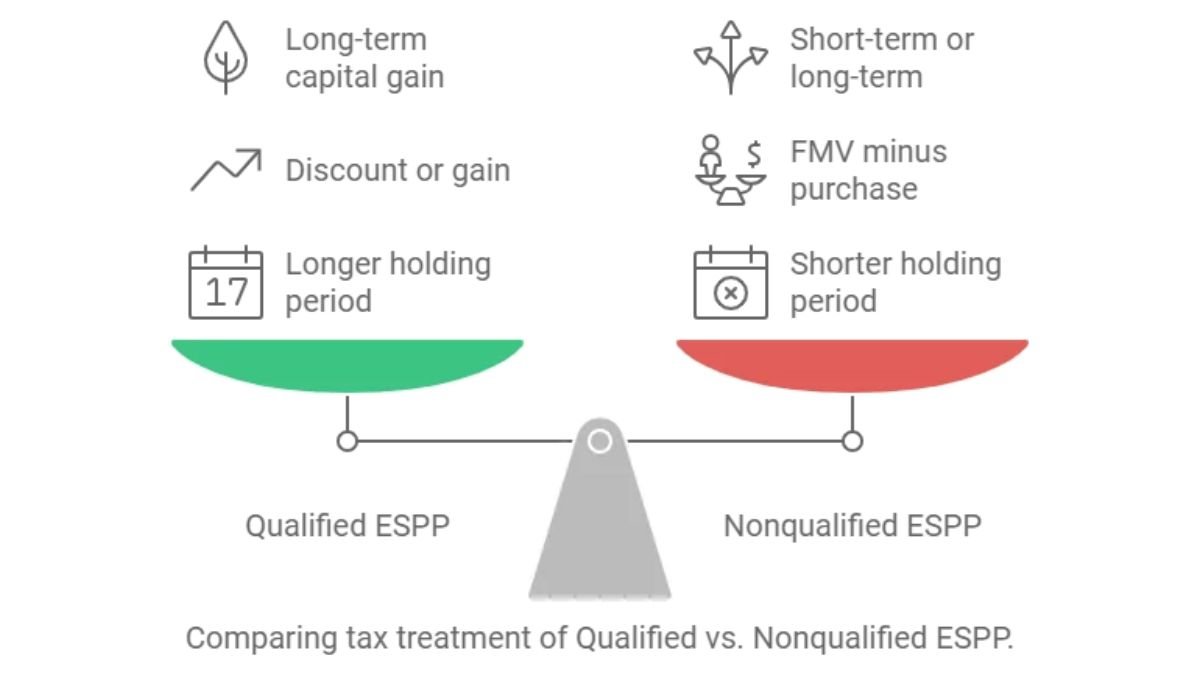
The difference between the two is the holding period and how the income is taxed as shown below:
Qualified ESPP
- Held for more than 2 years from offering date, and 1 year from purchase date.
- Ordinary income reported on W-2 as part of your wages after stock is sold will be equal to the lesser of:
- The discount offered on the stock (the difference between the stock price on the offer date and the discounted purchase price), or
- The actual gain (the difference between the sale price and the purchase price).
- Any additional gain beyond the amount taxed as ordinary income is treated as a long-term capital gain. If there’s a loss on the sale, it is treated as a capital loss.
- Example:
- FMV on offer date: $100
- Exercise price (with discount): $85
- Sale price: $150
- Ordinary income = $15 (FMV on offer date minus purchase price)
- Long-term capital gain = $50 (Sale price minus FMV on offer date)
Nonqualified ESPP
- Does not meet the qualified ESPP holding period requirements
- When you exercise a nonqualified stock option, the discount (the stock’s fair market value on the exercise date minus the price you paid) is generally reported as compensation and included in your W-2 wages.
- Any additional gain or loss (the difference between the fair market value on the purchase date and the sale price) is treated as a capital gain or capital loss. The gain will be treated as short-term or long-term, depending on how long the stock was held after purchase.
- Example:
- Purchase price: $85
- FMV on purchase date: $125
- Sale price: $150
- Ordinary income = $40 (FMV on purchase date minus purchase price)
- Capital gain = $25 (Sale price minus FMV on purchase date)
- Short-term or long-term depending on holding period
For both qualified and nonqualified ESPPs, your cost basis is what you paid for the stock plus any amount included on your W-2* from exercising the stock. Note the cost basis on your 1099-B will often not include the W-2 income, so you may need to make an adjustment to your basis to include it.
Make sure your employer includes the right amount of income for your ESPP purchases on your W-2. Some employers will include an entry for Form W-2, Box 14 that states “ESPP” in the description and the amount included as income in Box 1 of your W-2. If you aren’t sure whether your employer included the income, you can contact your payroll department.
If your employer has not included the correct income for your ESPP stock on your W-2, contact your employer to receive a corrected W-2.
Your W-2 may look something like this:
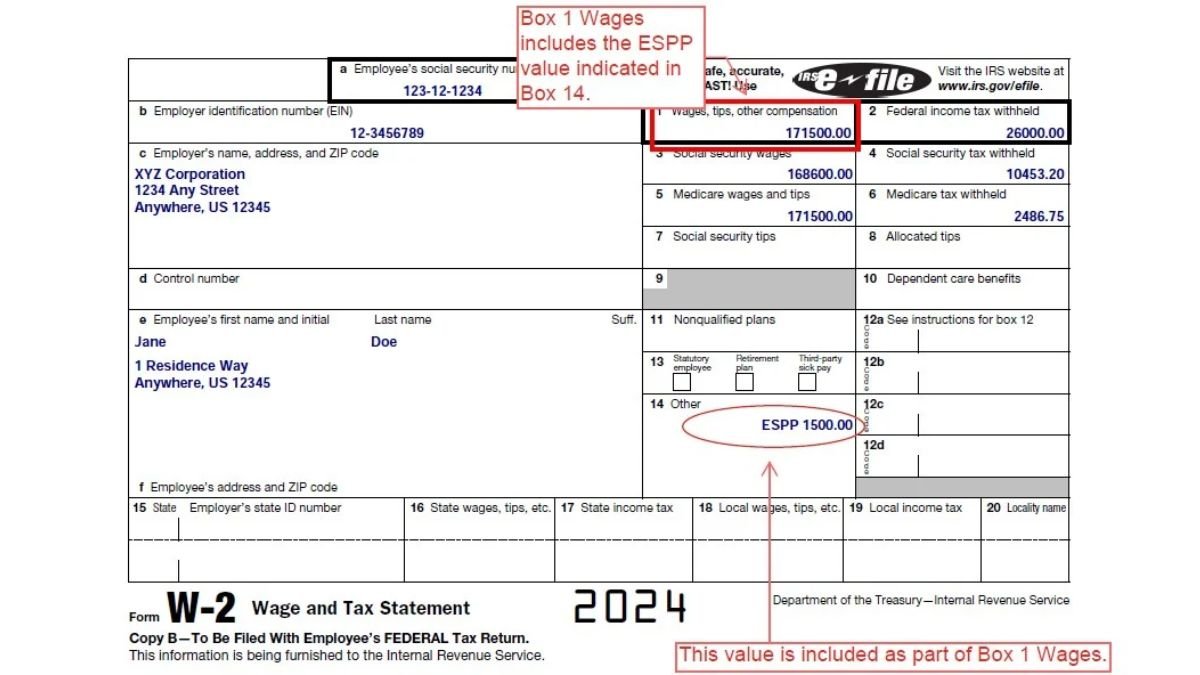
To enter your W-2, follow this menu path: Income > Wages (W-2).
If you purchased ESPP stock, your employer will send you Form 3922 in the year of purchase. This is an information only form and isn’t entered on your tax return. Form 3922 provides information to determine the cost basis and purchase date of your stock. Use this information when reporting the stock sale on your tax return. For reference, be sure to retain any Form(s) 3922 when you sell your ESPP shares.
Your form may look like this, although employers can use substitute forms with a different layout. The box numbers and box descriptions should match even if a substitute form is used
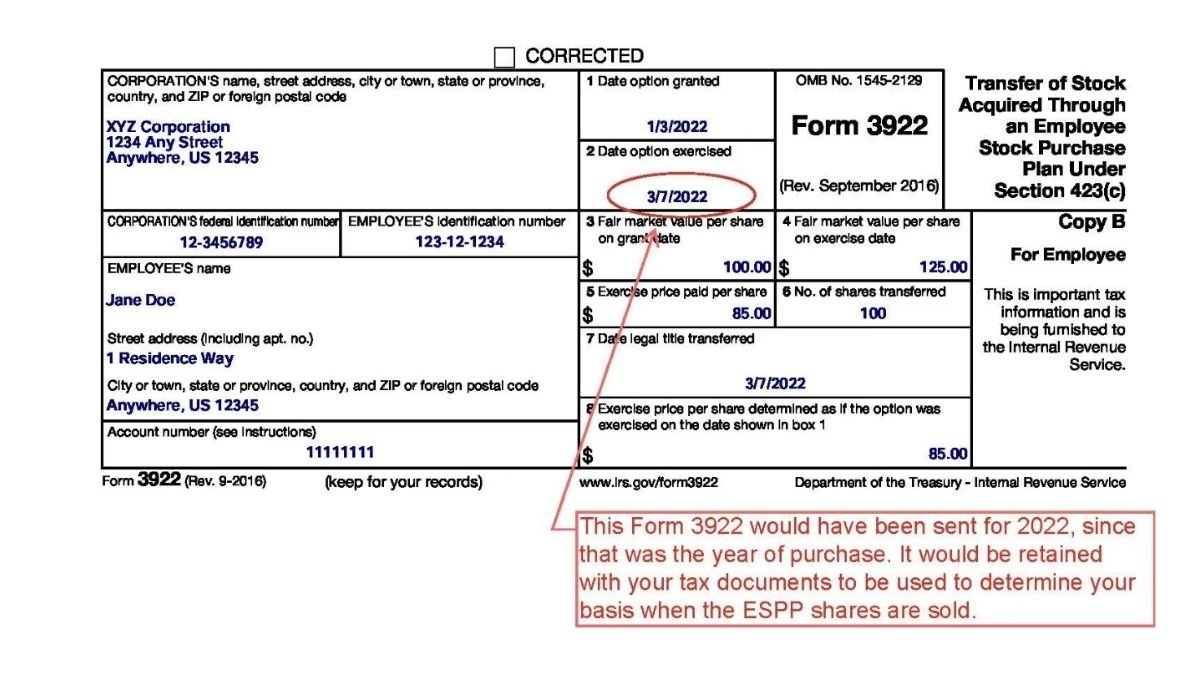
When you sell the stock, you’ll receive Form 1099-B showing the sales price and cost basis. Compare the cost basis on Form 3922 with the cost basis on the 1099-B to make sure the cost basis on the 1099-B is correct.
Most major brokers will provide a stock plan supplemental statement, often called a “Stock Plan Supplement” or “Employee Stock Cost Basis Supplement”, which breaks down how the W-2 income should be added to your company stock basis for your 1099-B.
Here is what Form 1099-B from the example above may look like. Substitute 1099-B forms are often used by brokerages, so the format will likely look different. However, the box numbers and box descriptions will match.
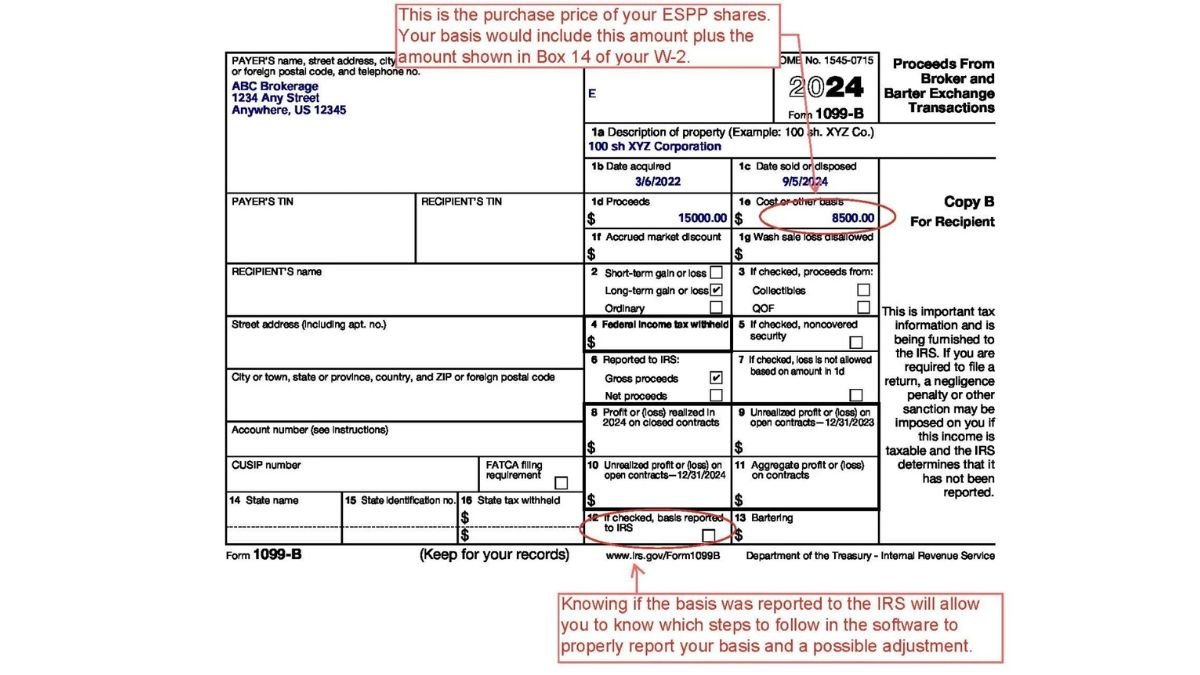
Entry of stock sales are done the same way in the software for both qualified and nonqualified ESPP sales. However, the entry steps vary slightly whether the basis was or was not reported to the IRS.
1099-B indicates basis was reported to the IRS:
- Select Income > Investments and Savings
- Select “Add an Investment”.
- Select “Stock Sales (1099-B)” and select “Save and Continue”.
- Enter your brokerage or bank name and select “Save and Continue”.
- Continue in the software until you reach the “Tell us about your stock sale” page.
- Enter your 1099-B information and select “Save and Continue”.
- On the “Tell us more about your stock sale” page, select ‘yes’ to “Do you have adjustment to this investment sale?” Select “Save and Continue”.
- Check the box “The basis shown in Box 1e is incorrect” and select “Save and Continue”.
- On the “Tell us about the adjustment to your stock sale” page, enter what the correct total basis should be. Select “Save and Continue”.
Once you have done this, the software will calculate the difference between what you enter as the correct basis and the amount entered from the 1099-B and report it on Form 8949.
1099-B indicates basis wasn’t reported to the IRS:
Follow steps 1-5 above. When you reach Step 6, enter the correct basis in the “Cost or Other Basis” box. Continue in the software and don’t enter an adjustment.
Terminology:
- Grant date = Offer date
- Grant price = Offer price
- Exercise date = Purchase date
- Exercise price = Purchase price
- Basis = Purchase price + amount already included in wages as indicated in Box 14 of your W-2.
*Not currently supported by our software:
If the ESPP discounted price wasn’t included on your W-2, then you’ll need to account for it elsewhere. In this case: The Schedule 1 instructions indicate any income from the exercise of stock options not otherwise reported on Form 1040 can be reported on line 8k. Unfortunately, our software doesn’t currently support that option, so you’ll need to find another way to prepare your tax return if you want to report an amount on line 8k.
The main difference comes down to holding period requirements and how your discount is taxed:
Qualified ESPP: Meets IRS holding period rules (held > 2 years from offer/grant date AND > 1 year from purchase/exercise date). A portion of the discount is taxed as ordinary income, while additional gains receive favorable long-term capital gains treatment.
Nonqualified ESPP: Sold before meeting the holding period requirements (also known as a disqualifying disposition). The discount at purchase (FMV_Purchase- Purchase Price) is fully taxed as ordinary income on your W-2 in the year of purchase/sale.
Your true cost basis is calculated as: True Cost Basis = Purchase Price Paid+ W-2 Compensation Income
Important: Brokerages often report only the discounted purchase price in Box 1e of Form 1099-B. If you do not adjust your cost basis to include the ordinary income reported on your W-2, you will end up paying tax twice on the same discount.
Form 3922 (Transfer of Stock Acquired Through an Employee Stock Purchase Plan) is an information-only statement issued by your employer in the year you purchase ESPP shares.
Do not file it directly with your tax return.
Keep it for your records—it contains essential values needed to calculate your cost basis and determine ordinary income vs. capital gains when you eventually sell the stock (e.g., Offer Date FMV, Purchase Date FMV, and Purchase Price Paid).
Follow these standard software navigation steps when reporting the sale:
Go to Income > Investments and Savings and select Add an Investment (Stock Sales 1099-B).
Enter the initial details from your Form 1099-B.
On the sale details page, check “Do you have an adjustment to this investment sale?”.
Select “The basis shown in Box 1e is incorrect”.
Enter your calculated True Total Basis (Purchase Price + W-2 Income). The software will automatically calculate the adjustment and report it on Form 8949.
Look at Box 14 of your Form W-2, where employers often include an entry labeled “ESPP” or “ESPP Income”.
This amount represents the taxable compensation already added into Box 1 (Wages, Tips, Other Compensation). You can also reference your broker’s Stock Plan Supplemental Statement (or Employee Stock Cost Basis Supplement) for a line-by-line breakdown of the exact W-2 income to add to your 1099-B basis.

Suresh holds a Master of Commerce (M.Com) degree and is a dedicated personal finance researcher and writer. Combining his advanced academic background in commerce with deep industry research, he covers complex topics like taxation, banking systems, credit analysis, and personal finance strategies. As the founder of Tax Assistant (taxassistant.org), Suresh is committed to translating complicated financial guidelines and economic data into simple, accurate, and actionable educational resources for everyday readers.
